Color Night Vision Camera Simulator & VR7.31.14
Publisher Description
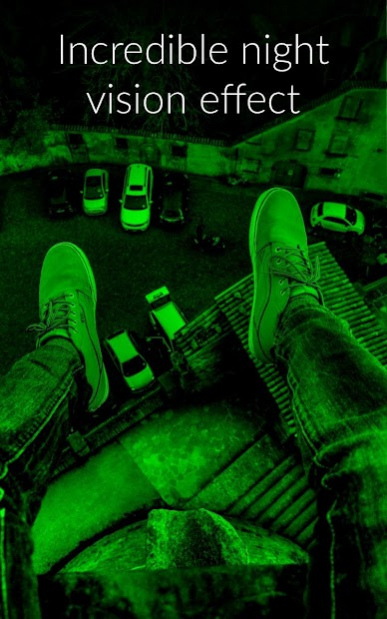
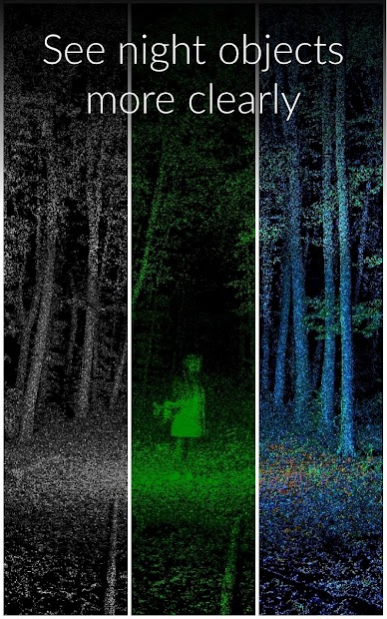
The Night Vision Camera app takes real pictures and videos at the lowest luminosity without any additional appliances. App will digitally amplify the slightest light beam reaching the camera of your device trying to simulate the real night vision goggles functionality.
*** App needs some light in order to work - it will not work in complete darkness ***
You can use this application to take pictures & video at low light as a torch app at complete darkness, as a mirror and selfie application using the front camera and many more.
Algorithm used is now revealed!
Application utilizes a breakthrough technology, pushing all the computing and hardware abilities of your phone to the limit, thus producing an outstanding effect.
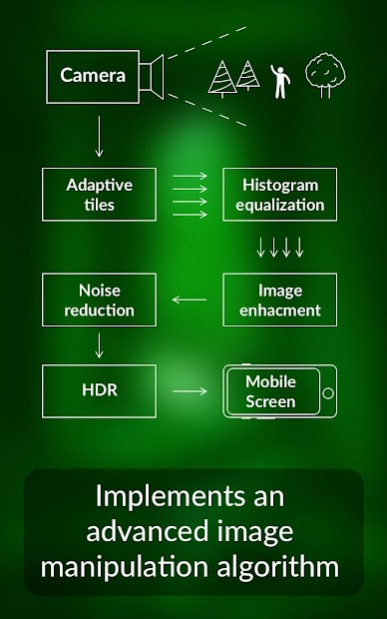
The algorithm used by this app is based on the histogram equalization method. It will try to maximize the contrast of the image adapting to the light conditions. (Find more information here https://en.wikipedia.org/wiki/Histogram_equalization).
*** Use the adaptive tiles functionality so a bright spot does not blinds the image ***
With the latest update an application of the adaptive histogram equalization by interpolation algorithm is included. If you unlock the feature the screen will be divided to a grid of smaller parts. The histogram equalization algorithm will be then applied individually to each part.
You can find more information here https://en.wikipedia.org/wiki/Adaptive_histogram_equalization
The application includes the following features
- Virtual reality (VR) mode
- Optimizes camera for low light conditions.
- Gain slider to control the digital amplification.
- Exposure compensation slider to manually adjust the brightness of the camera preview.
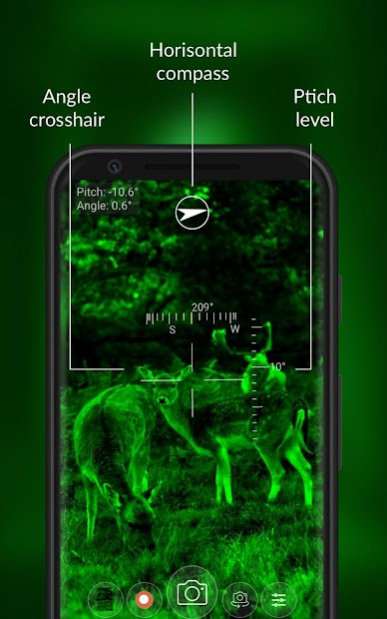
- Pitch level - shows the horizontal pitch level of the device.
- Angle cross hair - show the angle of the device.
- Vertical compass - shows the geographic direction of the device when hold vertical.
- Horizontal compass - shows the geographic direction of the device when hold horizontally.
- Touch to focus at the desired location.
- Customized effect improves the color of the image.
- Color, green, red and black&white filters.
- Silent mode - shutter on/off.
- Zoom control
- Flash options depending on your device (On, off, auto, red eye, torch)
- Automatic brightness adjustment, works on normal light as well.
- Front, rear camera
- Last image captured display - click to open gallery
Photo edit functionality: You can apply the color night vision unique algorithm to process dark photos and give them some light.
Edited photos can be used as wallpaper or be shared with any known methods like to Facebook, Instagram or upload to cloud.
DISCLAIMER
This app will not work in complete darkness (unless you are using the torch). Visibility in complete darkness requires infrared camera, something that Android phones does not have.
Remember, this night mode camera application does not provide the capabilities of a real night vision device. It just improves the brightness of the camera in the dark and is meant to be used for fun. The final result depends on the camera quality on your phone. The algorithm works well while using high quality phone camera as compare to low quality phone camera.
About Color Night Vision Camera Simulator & VR
The company that develops Color Night Vision Camera Simulator & VR is ziro div. The latest version released by its developer is 7.31.14.
To install Color Night Vision Camera Simulator & VR on your Android device, just click the green Continue To App button above to start the installation process. The app is listed on our website since 2022-05-01 and was downloaded 58 times. We have already checked if the download link is safe, however for your own protection we recommend that you scan the downloaded app with your antivirus. Your antivirus may detect the Color Night Vision Camera Simulator & VR as malware as malware if the download link to com.zirodiv.android.ColorNightVisionEffect is broken.
How to install Color Night Vision Camera Simulator & VR on your Android device:
- Click on the Continue To App button on our website. This will redirect you to Google Play.
- Once the Color Night Vision Camera Simulator & VR is shown in the Google Play listing of your Android device, you can start its download and installation. Tap on the Install button located below the search bar and to the right of the app icon.
- A pop-up window with the permissions required by Color Night Vision Camera Simulator & VR will be shown. Click on Accept to continue the process.
- Color Night Vision Camera Simulator & VR will be downloaded onto your device, displaying a progress. Once the download completes, the installation will start and you'll get a notification after the installation is finished.
Program Details
System requirements
Download information
Pricing
Version History
version 7.31.14
posted on 2022-05-01
Bug fixes
version 7.31.10
posted on 2022-02-21
Small GUI and performance improvements. Minor bug fixes
version 7.31.6
posted on 2021-12-05
Fixed icons not appearing on some devices & more bug fixes
version 7.31.2
posted on 2021-01-25
Minor bug fixes
version 7.27.4
posted on 2020-12-11
Updated libs and bug fixes
version 7.27.3
posted on 2019-11-12
Fixed vr issue for all devices
version 7.27.2
posted on 2019-10-15
Fixes for Android v10
UI Improvements
version 7.27.0
posted on 2019-06-22
Added crop and rotate feature
version
posted on 2018-02-15
Added adaptive tiles so maximum contrast is achieved at parts of the screen. A single beam will not darken the hole image.
Needs to be unlocked through the new store.
version 5.6
posted on 2016-11-24
Removed video ads.,Unlocked photo editing.
